

Your Licence Count Is Set by Engineers, Not Buyers
Most organizations treat licensing as a procurement activity. Someone counts users, picks tiers, negotiates, and the number arrives at the end of a process that started with a budget.
That sequence has quietly reversed. Two decisions now set your Dynamics 365 license requirements, technical people make both, and both happen long before anyone opens a spreadsheet.
Where the Count Is Actually Set
One decision sits inside the system, in how a team builds its security roles. The other sits outside it, in how many layers stand between a person and the product.
Neither is a purchasing conversation. Both are engineering decisions that became commercial ones, and in most organizations nobody has told the engineers.
That gap explains why licence surprises so rarely trace back to a bad negotiation. The negotiation was fine. The count it was negotiating had already moved, twice, in rooms the buyer never sat in.
Inside the System: Role Design Became a Licence Position
Security role design used to be purely a controls question. Who sees what, who approves what, where segregation of duties sits.
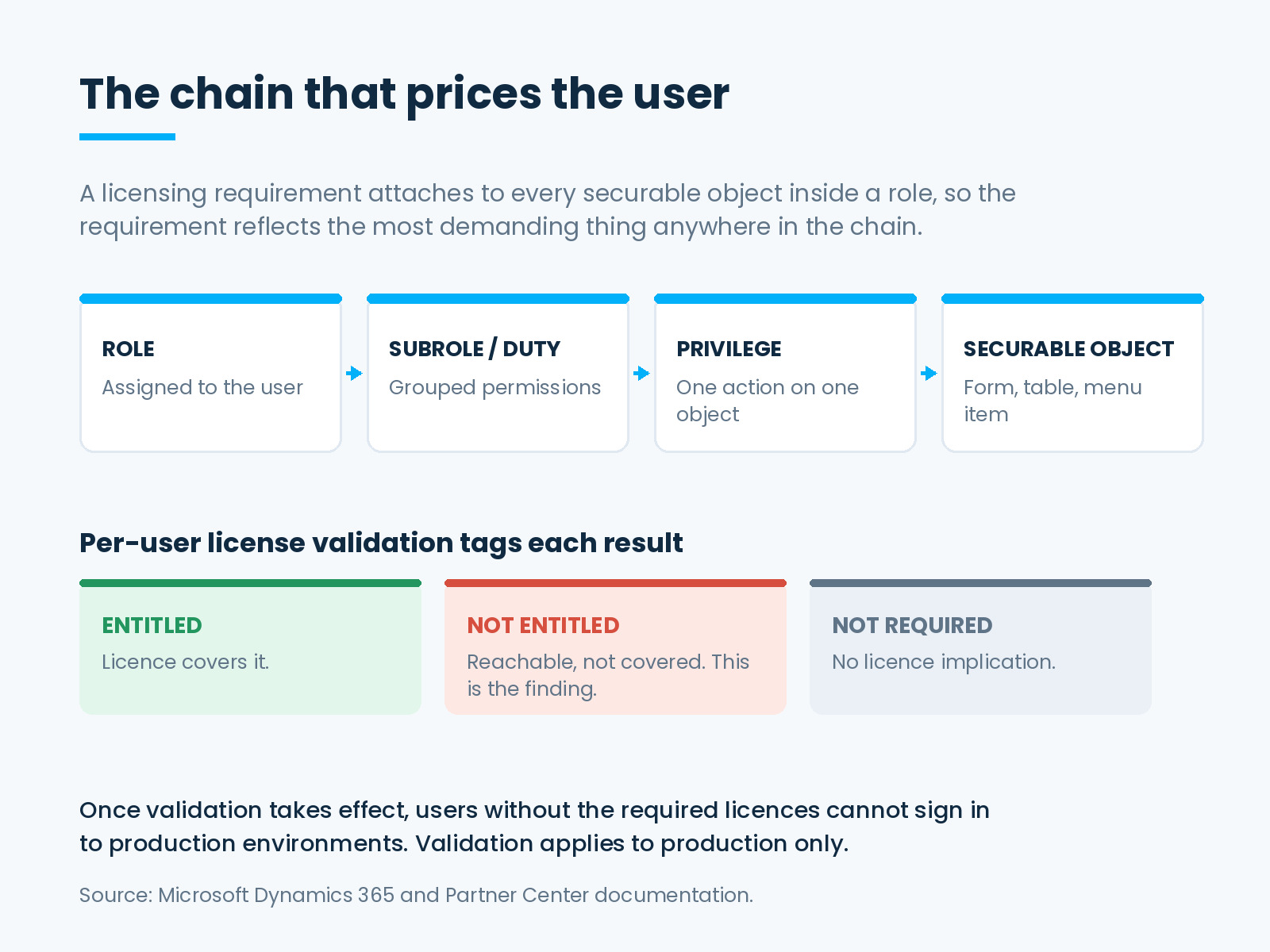
It is still that. It is now also a pricing mechanism, because licence requirements derive from roles. Microsoft documents that the roles you assign to enabled users determine licensing requirements, and that a licensing requirement attaches to every securable object included in a role. Developers build roles from a hierarchy of subroles, duties, privileges and directly referenced securable objects, so the requirement reflects the most demanding thing anywhere in that chain.
The consequence is blunt. A user who reads all day and writes once is priced on the write. One privilege, inherited from a role somebody copied years ago, can lift a person into a higher tier while nothing in their working day changes, and nothing in the interface flags it.
Per-user license validation makes this visible. It checks each user’s effective access down that chain against the licence they hold, and tags each result Entitled, Not Entitled or Not Required. The Not Entitled rows are the ones that matter: each is a specific object a user can reach that their licence does not cover.
Microsoft also documents what happens when validation takes effect. Users without the assigned required licences cannot sign in to production environments. The validation applies to production access only, which means the environment where a team would normally catch the problem is the one environment where the check does not run. A clean user acceptance cycle proves nothing here.
The Remediation Playbook
This is real work rather than a report to circulate, and it runs in a particular order.
- Read the failures first. Start with Not Entitled. Each row is a finding, not a number to negotiate.
- Trace to the privilege, not the role. A role showing an unexpected requirement is a symptom. The cause is usually one write privilege on one table, inherited or added for a reason that no longer exists.
- Decide role or licence, per finding. Change the role so the user no longer reaches the object, or buy the licence that covers it. Both are legitimate. Leaving it is not, because enforcement removes the user’s access.
- Retire what should not be counted. Microsoft recommends disabling users on the Users page when people leave or stop using the apps, for security and to avoid licensing requirements for people who are not working in the system. This is usually the largest single correction.
- Map personas to licence types. An approver, a report consumer, a data entry clerk and a configurer are four personas with four answers. Doing this once converts licensing from an annual argument into a maintained map.
Outside the System: A Portal Does Not Reduce the Count
The second decision happens in architecture review, usually phrased as a saving. Put a lightweight front end on top, and the warehouse team will not need licences.
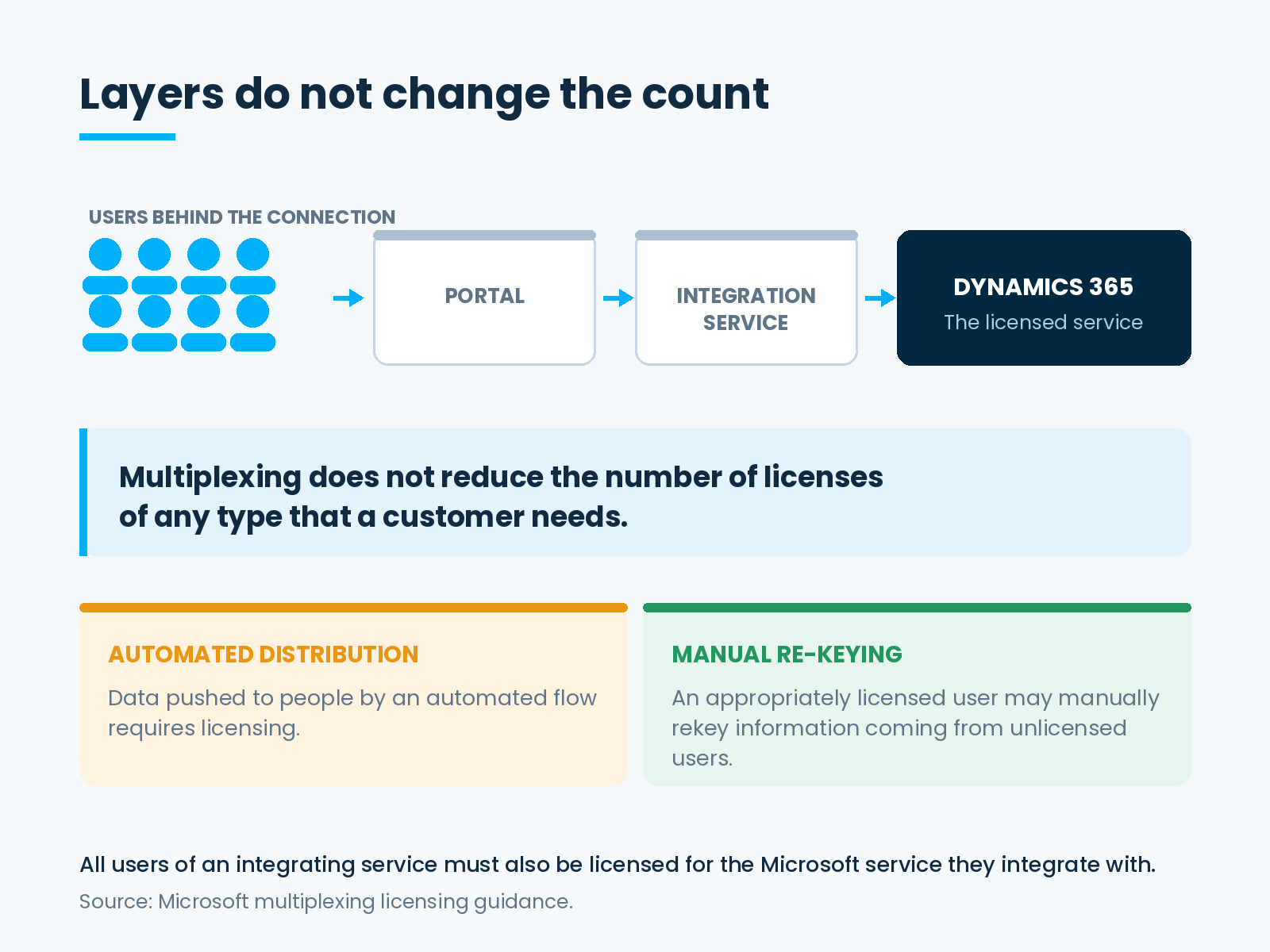
It is among the most common proposals in mid-market ERP, and it does not work. Microsoft’s multiplexing guidance defines multiplexing as any method, including hardware, software or automation, used to pool connections, and states plainly that multiplexing does not reduce the number of licenses of any type that a customer needs.
The guidance is equally clear that the number of tiers of hardware or software between the service and the users does not change the count. Where a third-party service integrates with Dynamics 365, all users of that integrating service must also be licensed for the Microsoft service they are integrated with, even where they never open it directly.
There is one real distinction worth designing around. Automated distribution of data requires licensing, while appropriately licensed users may manually rekey information coming from unlicensed users. That is a narrow allowance rather than a loophole. Building a process around manual re-keying trades a licence cost for a labour cost and an error rate, which is usually a worse deal than the licence.
A portal is a user experience decision. It can be an excellent one. It is not a licensing decision.
Where the Guidance Contradicts Itself
One point deserves stating honestly rather than confidently, because Microsoft’s own page does not settle it.
The multiplexing guidance says in one place that indirectly reading data from the application does not require the application licence, and offers an example describing indirect reads as permissible regardless of whether the data is restricted or unrestricted. Elsewhere on the same page, it states that data sitting in restricted tables requires a Dynamics 365 licence.
Those statements point in different directions, and the page does not reconcile them. Anyone who tells you the answer is obvious is choosing a side the documentation has not chosen.
The page also carries a disclaimer worth remembering across this whole topic: in the case of any conflict between the guidance and your agreement, the terms of your agreement control. For a design that turns on indirect reads of restricted data, get the position in writing from Microsoft or your licensing partner before building.
What Both Halves Have in Common
Each half of this looks like a different problem. They are the same problem.
In both cases a technical decision sets a commercial outcome, and the people making it have no reason to know that. A developer adding a privilege is solving a support ticket. An architect adding a portal is improving an experience. Neither is being careless.
The failure is organizational. Role design and integration design do not pass through any licensing gate, so the count moves without a decision, and the first time anyone notices is a renewal or an enforcement date.
What to Do This Quarter
Run the entitlement report and work the Not Entitled list. Trace each one to the object behind it. Disable the accounts that should not count at all. Group the remaining users by what they actually do and map those personas to licence types.
Then list every system that talks to Dynamics 365 and ask who the humans at the far end are.
Finally, add one question to each review that currently has no licensing gate. For a role change: does this alter the licence requirement for anyone holding it. For an integration: who are the people behind the connection. Both questions cost nothing at design time.
If you are looking at light users specifically, the same exercise overlaps with licensing approval-only users and with finding the licences nobody uses.
DAX Software Solutions: Right License, Right People, Real Value
This work sits exactly where implementation, managed services and recovery overlap, which is why it tends to fall between teams. DAX Software Solutions covers all three.
DAX helps clients:
- Trace Not Entitled results to the privileges causing them, and fix either the role or the licence, deliberately.
- Rationalize roles that accumulated access over years of customization, without breaking the work people do.
- Review integration and portal designs for licensing impact at design time rather than after delivery.
- Implement, optimize and support Dynamics 365 Finance, Supply Chain Management and Business Central, including stabilizing implementations where role design has drifted.
Licensing stopped being a procurement outcome some time ago. It is now a design output, and design outputs are reviewable before they ship.
Before your next role change or integration goes live, talk to DAX Software Solutions about what it does to your licence position.