

Your Users Can Buy Their Own Licences
By DAX Software Solutions ·
Someone in finance needed a premium connector on a Tuesday. They hit the paywall, entered a credit card, and carried on with their afternoon. No ticket, no approval, nothing broken. Power Platform self-service purchase sits switched on in your tenant right now, and the question is not whether to be alarmed. It is whether anyone has ever made a decision about it.
What is self-service purchase?
It is Microsoft’s supported route for an individual user to buy their own licence without going through IT. Microsoft states that any user with a non-guest account in a managed Microsoft Entra tenant can make a self-service purchase, and that credit card is currently the only payment method available.
The products covered are Power BI, Power Apps and Power Automate, together with Project and Visio. Geographic and sector exclusions matter too. Microsoft states that self-service purchase is not available in India, or for government or education customers, and that Project and Visio are additionally unavailable in Brazil and the Democratic Republic of Congo.
So this is not shadow IT in the usual sense. Nobody smuggled anything past a control. Microsoft built the door, left it open deliberately, and documented where the receipts land.
Is Power Platform self-service purchase on by default?
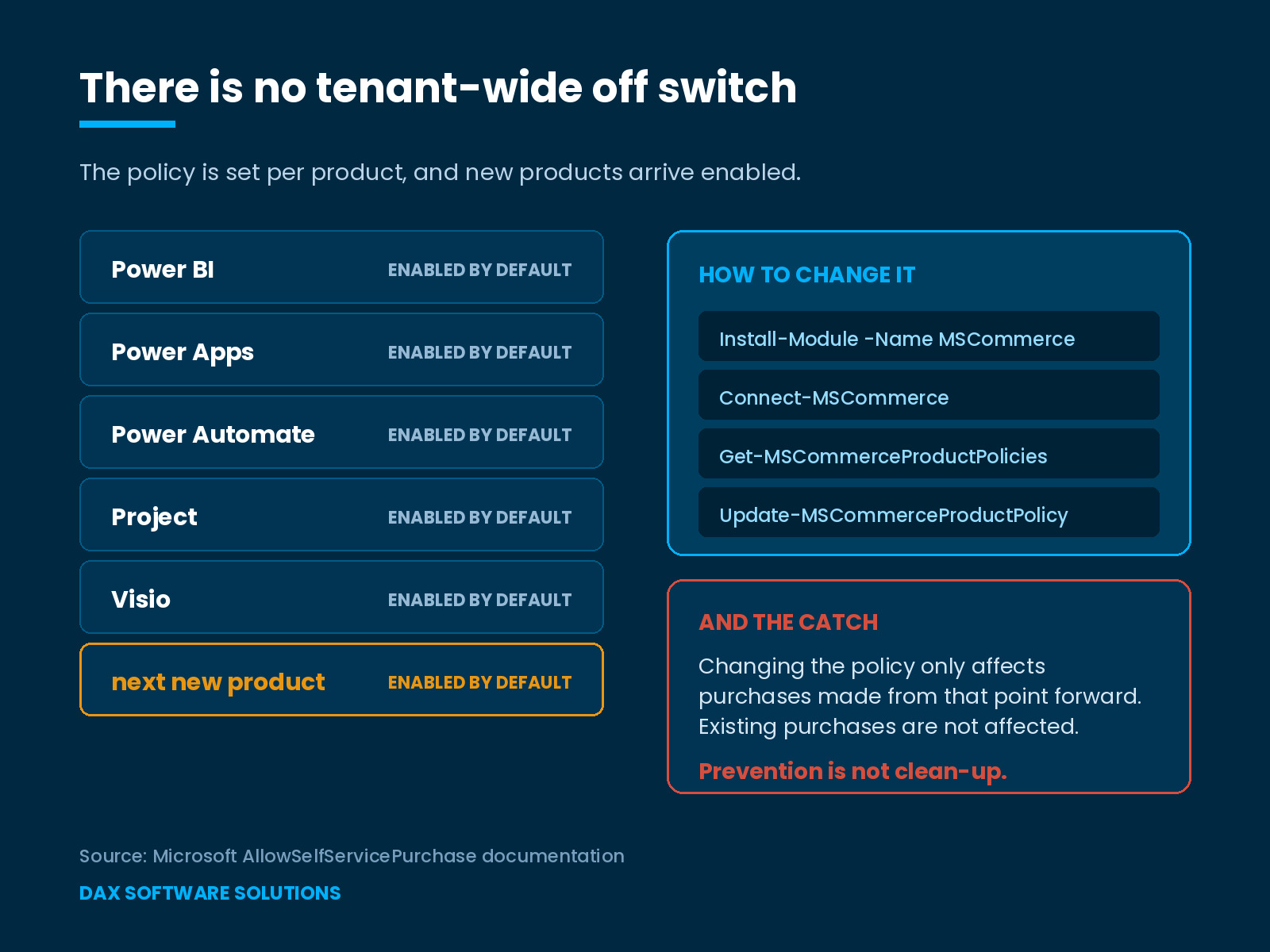
Yes. Microsoft states that by default all new products allow users to make a self-service purchase, and that self-service trials are enabled by default too.
That default carries a consequence most governance reviews miss. A tenant you close today reopens for every product Microsoft adds tomorrow, because each new product arrives with the permission already granted. This becomes a standing review item rather than a one-off task.
Can you turn it off for the whole tenant?
No, and this detail turns a five-minute job into a real piece of work.
Microsoft states that self-service purchases and trials cannot be completely turned off at the tenant level with a single command, that the AllowSelfServicePurchase policy works on a per-product basis, and that turning it off for the entire tenant means turning off each product individually.
Purchases run through the MSCommerce PowerShell module. You install it with Install-Module -Name MSCommerce, connect with Connect-MSCommerce, review the current position with Get-MSCommerceProductPolicies, and disable a single product with Update-MSCommerceProductPolicy using the value Disabled. Microsoft requires the Global or Billing Administrator role to change these policies, and Global Reader to view them.
Trials have a friendlier path. A Global Administrator can set a product to Do not allow in the Microsoft 365 admin center under Settings, Org settings, Services, then Self-service trials and purchases. Microsoft notes that change can take up to 72 hours.
The part that actually bites
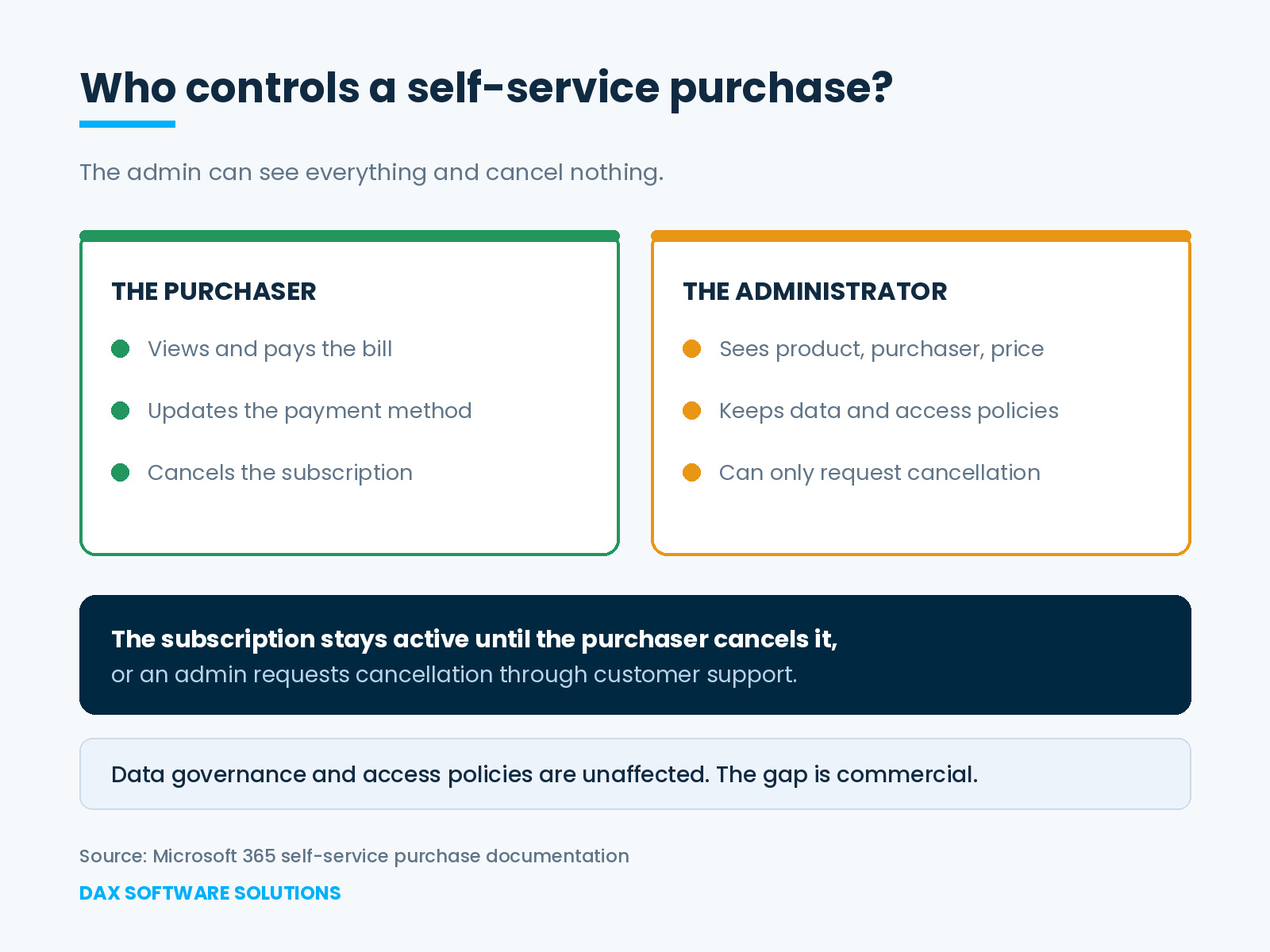
Here is the finding most teams do not expect. Your administrator cannot cancel these subscriptions.
Microsoft is explicit that the purchaser manages the purchase. The purchaser views and pays the bill, updates the payment method, and cancels the subscription. An admin can request cancellation through customer support, and until that happens the subscription stays active until the purchaser cancels it directly.
Read that against a leaver. A colleague buys a Power Automate licence in March, leaves in September, and the subscription keeps billing a card your organization may not even control. Nothing in your joiner, mover and leaver process touches it, because that process grew up around licences IT assigned.
A second sting sits alongside it. Microsoft states that changing the AllowSelfServicePurchase value only affects purchases made from that point forward, and that existing purchases are not affected. Switching the policy off prevents the next one. It does nothing about the ones already running.
What administrators can still control
Here the story stops being a security scare, and the distinction matters because it changes who should own the response.
Microsoft confirms that administrators hold the same data management and access policies over products bought through self-service purchase as over products bought centrally. Your data governance, conditional access and compliance posture stay intact. The gap is commercial, not technical.
The practical effect is that this belongs with whoever owns the Microsoft bill rather than with the security team. Power Platform self-service purchase does not widen what a user can reach. It widens what the organization pays for, and it moves the billing relationship to a person rather than a department.
Administrators can also see exactly what happened. Global and billing administrators can view these subscriptions under Billing and then Your products in the Microsoft 365 admin center, including the product, purchaser name, subscriptions purchased, expiry date, order history, purchase price and assigned users. Self-service trials appear on their own tab.
How should you handle Power Platform self-service purchase?
Four questions, answered in this order:
- What has already been bought? Open Billing, then Your products, and read the purchaser names before writing any policy.
- Which of those purchases should become central licences, given that Microsoft’s own suggestion is to assign a centrally purchased licence and then ask the purchaser to cancel theirs?
- Which products should stay open? Power BI and Power Automate rarely deserve the same answer, and the per-product mechanism forces a choice anyway.
- Who reviews this each quarter, given that every new Microsoft product arrives with self-service purchase enabled?
Question one is the one organizations skip, and it is the only one that tells you what you already pay for. Everything else in Power Platform self-service purchase governance follows from that list.
Frequently asked questions
Who can make a self-service purchase?
Microsoft states that any user with a non-guest account in a managed Microsoft Entra tenant can. Guest users cannot complete a self-service purchase in a tenant where they are a guest.
Can an admin cancel a licence a user bought?
Not directly. The purchaser cancels it. An admin can request cancellation through customer support, and the subscription remains active until one of those happens.
Does disabling the policy remove existing purchases?
No. Microsoft states that the change affects purchases made from that point forward and leaves existing ones alone.
Where do these purchases show up?
Under Billing and then Your products in the Microsoft 365 admin center, with purchaser name, price and assigned users visible to global and billing admins.
Does Power Platform self-service purchase apply everywhere?
No. Microsoft states that it is unavailable in India and for government and education customers, and that Project and Visio are additionally unavailable in Brazil and the Democratic Republic of Congo. A multinational tenant can therefore carry the exposure in some countries and not others, which makes a single global assumption unsafe.
Make the decision deliberately
Power Platform self-service purchase is a reasonable feature solving a real problem. Someone needed a premium connector and got on with their work, which is usually what you want from the people you employ. The failure is not theirs. It is that most organizations have never decided whether that should be possible, and so run Microsoft’s default as though it were a policy.
It belongs in the same review as the other capacity and entitlement lines that move without a purchase order, and beside the question of how licence requirements follow design decisions rather than buyers.
Microsoft’s self-service purchase guidance is informational and product availability changes. Confirm the current position for your tenant and region before acting.
At DAX Software Solutions, our Power Platform practice covers Power Apps, Power Automate and Power BI, and governance of the estate forms part of that rather than an afterthought. If nobody has opened Your products recently, that is the hour worth spending. Talk to our team.