

Software Waste: The Gym Membership Nobody Cancels
A gym membership is the easiest money a business can waste. The payment leaves the account every month, the card never declines, and nothing about the transaction tells you whether anyone walked through the door. Finding out requires going to look.
Software licensing works the same way, at a far larger scale, and with the same silence. Nothing in the invoice distinguishes a license somebody opens every day from one assigned to a person who left in March. You keep paying either way.
Where Software Waste Actually Hides
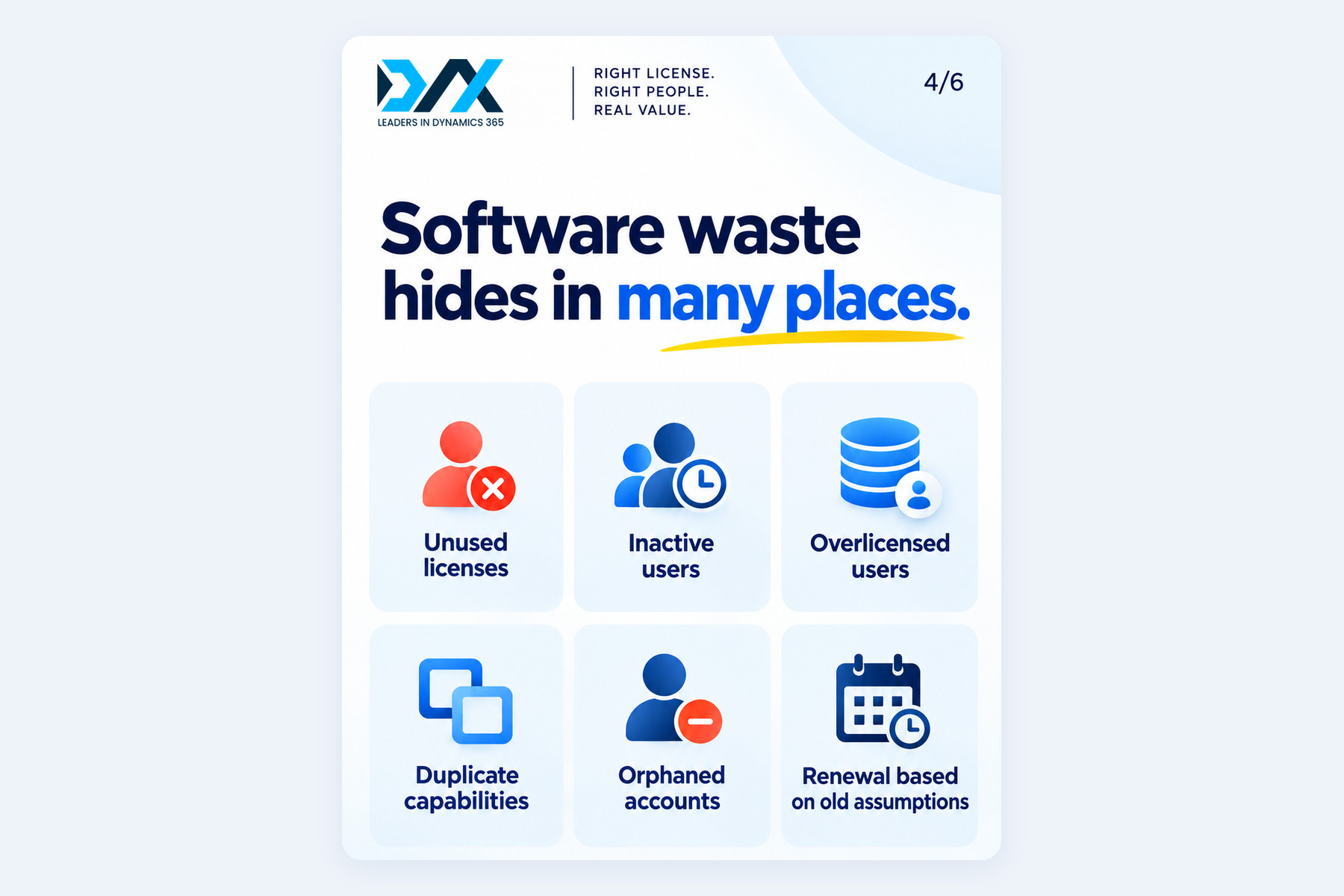
Waste is rarely one big mistake. It is six small ones, accumulating quietly.
- Unused licenses — bought for a project, a hiring plan or a rollout that changed shape, and never released.
- Inactive users — still assigned, still billed, no longer opening the application.
- Overlicensed users — on a premium tier for work that a lighter one covers.
- Duplicate capabilities — two tools doing one job, bought by two teams, renewing on two dates.
- Orphaned accounts — people who left, whose offboarding covered the systems holding sensitive data but not the ones quietly billing.
- Renewal based on old assumptions — a count carried forward from a year nobody has revisited.
Only the first of those looks like waste on an invoice. The rest look like normal operating cost.
The Four Questions Most Renewals Skip

Before pulling any data, write down four questions and leave the answers blank: how many licenses did we buy, how many are assigned, how many are actively used, and do all of those users need premium licenses.
Most organizations answer the first immediately, the second with some effort, and the third not at all. That distance between the first answer and the third is the whole exercise.
The fourth question usually surprises people, because it asks about tier rather than quantity. Quantity problems are visible in a spreadsheet. Tier problems are not, and they tend to carry the larger money.
Why the Gap Stays Invisible
Nothing in the system complains.
An unused license does not generate an error. An account belonging to a former employee raises no alert. A person holding a premium plan who only ever reads a dashboard hits no obstacle that would make anyone question the assignment. Cost that produces no symptom gets no attention, and software waste produces no symptom at all until somebody deliberately looks for it.
The renewal process reinforces that. It arrives as one line item, approved by someone who was not in the room when the licenses were bought, against a count nobody has revisited. The question asked is whether the number went up, not whether the number was ever right.
Where to Look in Dynamics 365
For organizations on Dynamics 365 finance and operations apps, three places answer most of this.
The Power Platform admin center compares required, purchased and assigned licenses by product. That reconciliation finds unassigned licenses, which are the cleanest category of waste: removing them at renewal disrupts nobody and requires no conversation.
The user activity aging report, in the user security governance workspace, identifies users who have stopped working in the system. Microsoft also recommends disabling users on the Users page when people leave or stop using the apps, both for internal security and to avoid licensing requirements for people who are not working in the system.
The license usage summary report shows which licenses each user requires based on their assigned security roles, with a detail panel tracing each requirement down to the individual security objects behind it. This is where tier problems surface.
Overlicensing Is the One People Miss
A license requirement in Dynamics 365 does not follow a job title. It follows the most demanding permission inside the security role a person holds.
Microsoft documents that the roles you assign to enabled users determine licensing requirements, and that a licensing requirement attaches to every securable object included in a role. So one privilege inherited from a role copied years ago can lift someone to a full application license while nothing in their daily work depends on it. Microsoft’s own documentation offers the example of a warehouse clerk showing a Finance requirement, which points at an inappropriate role assignment rather than a genuine need.
This is why a count-based review misses so much. Every license is assigned, the people are real, and the users are active. The waste sits in the tier, and only a role-level look will show it.
There is a second reason to care about this now. Microsoft is moving to per-user license validation for finance and operations apps, which ties production sign-in to the licenses a user’s roles require. The same role review that finds waste today also finds the gaps that would block people later, so the work counts twice.
What the Review Produces
A license review produces a number: the gap between what the organization pays for and what it demonstrably uses. Knowing it changes the renewal conversation from an approval into a decision.
For every item the review surfaces there are four honest options.
- Remove the license where nobody is using it.
- Move the person to a lighter tier where the work does not need the premium one.
- Change the role where an inherited permission is driving the requirement rather than the job.
- Keep it where the person genuinely needs it, now recorded as a decision rather than an assumption.
Resolving the list uniformly defeats the purpose. Cutting across the board breaks people’s work; cutting nothing wastes the review.
Do It Before the Renewal, Not After
Timing decides whether any of this is worth doing.
A review finished before the renewal date changes what you sign. The same review finished afterwards produces a report nobody can act on for another twelve months, by which point the drift has resumed.
Start roughly a quarter out. That leaves room to pull the numbers, have the conversations the findings create, and make role changes carefully rather than in the week before a deadline. Role changes made in a hurry are how access problems get introduced, which is an expensive way to save money.
One caveat worth stating plainly: what a report shows a configuration requires and what an agreement entitles an organization to are different questions. The first is technical and the second is contractual, so confirm the second with Microsoft or the licensing partner who holds the contract before making any purchase decision.
DAX Software Solutions: Right License, Right People, Real Value
DAX Software Solutions works with organizations running Dynamics 365 Finance, Supply Chain Management and Business Central, and a license review is the kind of work that pays for itself quietly.
DAX helps clients:
- Reconcile purchased, assigned and actively used licenses across the Dynamics 365 estate.
- Identify inactive users, orphaned accounts and licenses nobody has released.
- Review security roles against the licensing each one requires, and trace unexpected requirements to the permissions behind them.
- Implement, optimize and upgrade Dynamics 365 Finance, Supply Chain Management and Business Central environments.
- Provide ongoing managed services and application support, so the picture stays current between renewals.
Nobody sets out to pay for software nobody uses. It accumulates quietly, because no part of the process notices. A review is simply the decision to go and look.
Curious what yours would reveal? Get in touch with DAX Software Solutions and we will help you find out.